Denegra Derbent · Secure AI access
Don’t ban AI.
Protect it.
One gateway between your people and any AI model. Names, ID numbers, secrets and code names are masked before they leave, and people keep using the AI they already like.
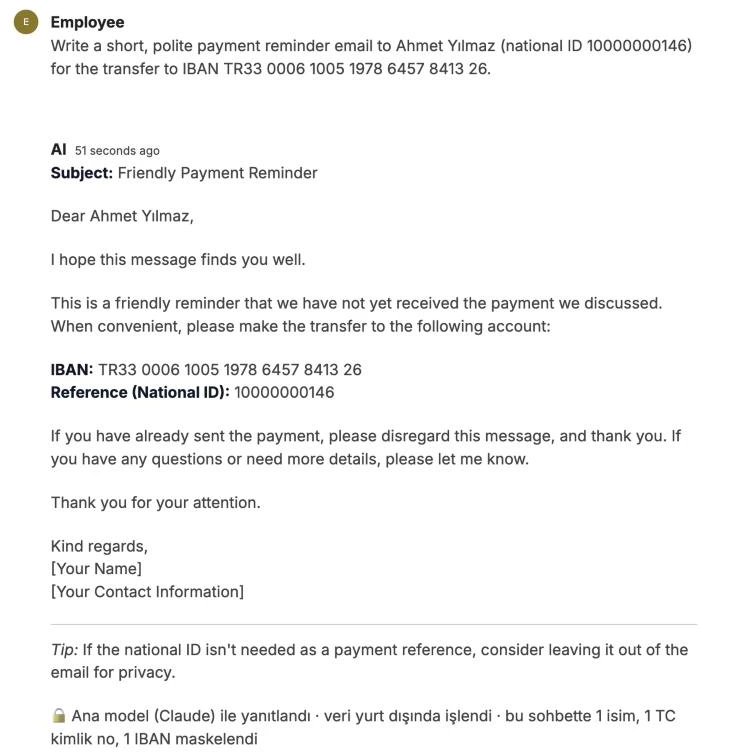
What the model never sees
-
The employee writes as usual
With a real name, ID number and IBAN.
-
Derbent swaps them for labels
Before the request leaves. The model gets:
… email to <PERSON_1> (national ID <TR_NATIONAL_ID_1>) for the transfer to IBAN <IBAN_CODE_1>. -
The reply comes back with the real values
Put back in place, and a note lists what was masked.
The problem
Employees already paste customer records, configuration files and project names into AI tools, because it saves them hours. Banning the tools does not stop it; it moves the usage to personal accounts the company cannot see.
The goal is to keep the productivity and remove the risk: the model does the work without ever seeing who it is about.
What sets Derbent apart
Fails closed
If masking fails, the request is never sent.
Beyond English
Turkish and English names, ID numbers, IBANs and addresses, checked by their checksums where they have one, plus your own customer and account numbers.
Checks the reply too
If a model writes personal data you never gave it, the reply is flagged, or masked or withheld before anyone reads it, as your policy says.
Your servers, your models
Runs on one server, with offline models. Restricted data can be kept on a model in the country.
Catches the leak’s source
Planted canary values name the leaked document and its sender. Leavers are watched until 30 days after their last day.
Proof for the auditor
Sealed records and a signed monthly evidence pack, mapped to GDPR, KVKK, POPIA, UAE PDPL, OWASP LLM Top 10 and the EU AI Act.
One gateway, four ways in
-
For employees
Derbent app
Approved models on one screen. Attachments and scans are masked, from PDF to PowerPoint.
-
For everyone
Browser extension
Masks what people type on 12 AI sites they already use.
-
For developers
Derbent connect
Coding assistants, agents and your own AI apps pass the same gate.
-
For security
Shadow AI discovery
Unapproved AI use made visible from your firewall logs. Nothing to install.
How it fits your setup
It runs in your infrastructure or cloud tenant and works with Azure OpenAI, Google Gemini, AWS Bedrock, other OpenAI-compatible services or a model in your own data centre. Employees connect the chat screen or coding assistant they already use.
Two packages. Both include budgets, the reply check and a one-page monthly report for management.
-
Standard
On its own
With records to your SIEM.
-
With Fortinet
Alongside your stack
With the FortiAIGate, FortiGate, FortiSASE and FortiAnalyzer you already run.
Pilot: live in three weeks
-
Week 1, install
Departments, budgets and confidential terms defined.
-
Week 2, connect
Chat, coding assistant, browser extension, Entra ID and your SIEM.
-
Week 3, prove
Test on your own prompts, get the first report and a signed evidence pack.
Not ready for a pilot? Share a month of firewall or web proxy logs and we show which AI tools your people use today, without installing anything.
Common questions
Does it change how employees use AI?
No. They keep using the same chat screen or coding assistant. Masking happens on the way to the model, and the answer comes back with the real values in place.
Where does it run?
In your own infrastructure or your cloud tenant. Requests go only to the models you configure.
Which AI models does it work with?
Azure OpenAI, Google Gemini, AWS Bedrock, other OpenAI-compatible services, or a model running in your own data centre. Several can be used at the same time.
Can we see AI usage before installing anything?
Yes. Share a month of firewall or web proxy logs and we show which AI tools are in use, by department, without connecting to your systems.